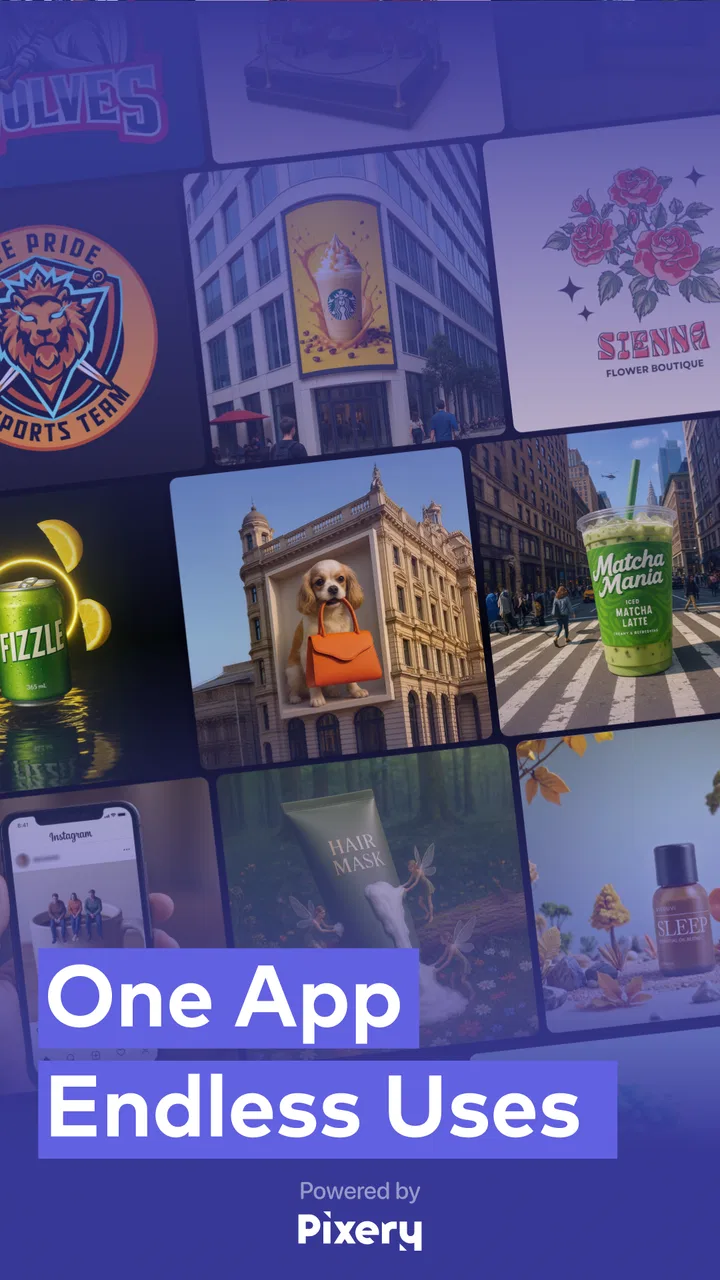
Impresso - Video & Logo Maker
- 4.5
- Rating
- 100.00K
- Installs
- Free
- Price

 Analysis by App-foxy
I approached Impresso - Video & Logo Maker as a practical design companion rather than a full desktop graphics suite. It sits in the video players and editors category, but its real appeal is broader: it brings AI-assisted graphic and brand design into a workflow aimed at people who need something presentable without spending an afternoon learning complex software. I found it most interesting when I treated it as a starting-point generator and then made deliberate choices about the result.
The app is free to download, suitable for Everyone, and developed by Pixery Bilgi Teknolojileri. It has reached over 100 thousand installs and holds a 4.5 average from around 2.8 thousand ratings, which gives it a useful level of early visibility without suggesting that it replaces every established design tool. The current version is 5.3.1, and it runs on Android 7.0 or later. Those details make it accessible to many older phones, although the experience naturally depends on how comfortably a particular device handles image and video work.
How I built a usable design from a blank start
My baseline workflow was simple: decide what the design needed to communicate, choose a suitable starting direction, generate or assemble a concept, and then edit it instead of accepting the first result. That last step matters. AI design tools are good at giving you momentum, but the first suggestion is rarely the one that best fits a real post, product image, or logo brief.
You May Also Like

 Blood Strike: 2.5 Anniversary
Blood Strike’s Loadouts Turn Every Drop Into a Tactical Gamble
A close look at Blood Strike’s custom loadouts: how fast access to signature weapons reshapes its battle royale rhythm, rewards preparation, and narrows the gap between fights.

 Pandora - Music & Podcasts
Pandora’s Music Is Easy to Start, but Harder to Recover
Pandora’s strength is its low-effort path from a seed to a station. Its weak spot is how much confidence it asks you to place in connection, setup, and quiet recovery.

 8 Ball Pool
 Is Built on Rivalries, Rematches, and Routine
A close look at the rivalries, rematches, shared routines, and unanswered safety questions that turn a quick pool match into a persistent mobile community.

 Samsung Music
’s Quiet Strength Is Playing What You Already Own
Its reach comes less from spectacle than from dependable access to a personal library. That simplicity is both the app’s strongest retention engine and its ceiling.

 AccuWeather: Weather Radar
AccuWeather Review: A Quick, Clear Forecast for Everyday Decisions
For everyday plans, the best forecast is the one you can understand quickly. AccuWeather makes rain timing, radar, and local conditions easy to act on, with a few trade-offs.

 Hill Climb Racing
Why Hill Climb Racing Still Turns Crashes Into One More Run
A tiny car, a bumpy hill and one more upgrade: Hill Climb Racing keeps resurfacing because its simple chaos makes every near-miss feel personal.
More From Our News Desk
View All News


For a small business announcement, I would begin with the practical facts: the product name, the action I want viewers to take, and the visual mood that suits the business. Keeping those decisions clear before opening the editor prevents the common mistake of chasing attractive layouts that say very little. In my experience, Impresso is more useful when I arrive with a purpose than when I expect it to invent the entire communication strategy.
The same approach works for short social videos. I would first gather the images or clips I actually intend to use, then use the app to shape the visual presentation around them. This is more efficient than repeatedly generating alternatives without knowing which assets must appear. It also makes the final result feel more personal, because the app is helping organize my material rather than replacing it completely.
Logo work needs a slightly different mindset. A generated mark may look impressive at a glance but still be awkward at small sizes, difficult to recognize in one color, or too close to a decorative illustration. I recommend checking a logo as a tiny profile image and as a plain, simple mark before treating it as finished. That habit is more valuable than endlessly requesting new concepts.
A realistic everyday scenario would be a café owner preparing a weekend promotion. Instead of opening a complicated design program, the owner could use Impresso to establish a branded visual, adapt it for a product announcement, and create a short promotional composition from the same idea. The advantage is consistency and speed. The trade-off is that the owner still needs to inspect spacing, wording, and readability rather than assuming an automated result is publication-ready.
What I check before editing the details
I pay attention to the relationship between the main subject and the empty space around it. AI-generated compositions can place the important element attractively while leaving too little room for a headline or call to action. If the design is intended for a busy social feed, I would rather have a clear subject and restrained text than a crowded layout filled with decorative choices.
I also check whether the visual style matches the intended audience. A playful treatment may suit a casual event but feel wrong for a professional service. This is where personal judgement remains essential. The app can accelerate exploration, yet it cannot reliably know the reputation a business wants to build or the cultural context in which the image will appear.
For videos, I look at the first moment before worrying about polish. If the opening frame does not explain why I should keep watching, attractive graphics will not solve the problem. I then inspect whether text remains readable against the background and whether transitions distract from the message. These checks are especially important on a phone, where it is easy to mistake a design that looks fine in the editor for one that will be clear in a fast-moving feed.
Settings and choices worth reviewing
One of the most useful habits with an app like this is to review every available choice before committing to a design. I would check the selected format, visual orientation, text placement, and any style controls that affect the overall tone. Even when the app makes a polished suggestion, a mismatch between the canvas and the destination can force awkward cropping later.
For a brand project, I would keep a small reference note with the preferred colors, wording, and visual personality. The point is not to pretend the app offers a complete brand-management system; it is to make my own decisions repeatable. When I return to create another asset, I can compare it against the earlier work instead of making each design from memory.
Text deserves a separate inspection. I would read every generated phrase for accuracy, tone, and unnecessary wording. A visually convincing graphic can still damage trust if a product name is misspelled or the call to action sounds unnatural. I also prefer short lines, because long copy often competes with the image and becomes harder to read on smaller screens.
Before exporting or sharing a finished piece, I would view it away from the editor and, if possible, on the device where the audience is likely to see it. This catches problems such as low contrast, tiny lettering, and details that disappear against a bright background. It is a modest step, but it separates a usable result from a design that only looks good while surrounded by editing controls.
The free entry point makes experimentation approachable, but users should pay attention to the purchase boundary as they work. Impresso includes in-app purchases ranging from $7.99 to $49.99 per item. I would explore the workflow first and decide whether it genuinely saves enough time before paying for anything. That is particularly important for occasional users who may only need a single logo or one promotional graphic.
Repeatable patterns that made my work faster
My fastest pattern was to create one strong visual direction and reuse its logic, rather than starting from a completely different idea for every asset. I would keep the same general mood, subject emphasis, and text discipline while adapting the content for a new announcement. This gives a small business a more recognizable presence and reduces the number of decisions required each time.
Another useful pattern is separating exploration from refinement. During exploration, I allow several concepts to compete and judge them quickly by clarity and suitability. During refinement, I stop changing the entire concept and focus on alignment, wording, contrast, and the balance between image and text. Mixing those stages wastes time because every small edit becomes irrelevant if the underlying direction is discarded.
For a recurring campaign, I would prepare the copy before opening the app. I might write a short headline, a supporting line, and the exact action the viewer should take. Then I can judge the generated layout against real content. This exposes a subtle weakness in many automated design workflows: a template may look excellent with placeholder text but fail when the actual message is longer or more specific.
I also found it sensible to keep a small shortlist of successful results rather than saving every variation. Too many near-identical options make later decisions harder. A focused selection lets me compare the designs based on concrete criteria: which one communicates fastest, which one remains legible at a small size, and which one feels most consistent with the intended brand.
When using the app for video and static graphics together, I would not force them to be identical. They can share a visual idea without using the same amount of text or the same pacing. A still image needs immediate clarity, while a video can reveal information in stages. Treating both formats as copies of one another often creates a static graphic that is too busy or a video that feels slow.
Where the AI approach helps, and where it stops
The strongest part of Impresso is the reduction of the blank-page problem. If I know the kind of visual I need but do not have a finished concept, an AI-assisted starting point can produce useful directions quickly. That is valuable for independent sellers, creators, students, and small teams that need decent presentation without hiring a designer for every minor announcement.
Its limitation is the same source of that convenience. A generated design may be attractive without being strategically correct. It may emphasize the wrong object, use a mood that does not fit the business, or produce a logo with details that disappear when reduced. I would therefore describe the app as a design accelerator, not an automatic art director.
Users who need precise vector construction, detailed layer control, complex retouching, or strict production specifications may prefer a traditional graphics editor. Those tools usually take longer to learn, but they offer deeper control when exact geometry and repeatable technical output matter. Impresso makes more sense when speed, accessibility, and idea generation are more important than painstaking control.
It is also not the ideal choice for someone who wants to edit a long, complex video project with elaborate timing and professional post-production requirements. Its positioning is better suited to branded visual content and shorter promotional work. If your priority is advanced audio mixing, detailed timeline editing, or cinematic finishing, a dedicated video editor will be a better match.
Another trade-off concerns originality. Starting from AI-assisted concepts can help me move quickly, but it can also encourage familiar-looking visual decisions. I would add a personal layer through the chosen imagery, wording, color decisions, and editing rather than publishing the first attractive result. That extra judgement is what makes the output feel connected to a real person or business.
Who should try it first
I would recommend Impresso to someone who regularly needs social graphics, product visuals, simple promotional videos, or early logo ideas but does not want to learn a heavyweight design application. It is especially suitable for a person who values a quick starting point and is willing to spend a few minutes checking the result carefully.
It can also suit a small team that needs a repeatable way to produce everyday marketing material. The team should agree on its own wording and visual rules, then use the app for faster execution. That workflow keeps the human decisions in charge while allowing the software to handle more of the initial composition work.
I would be more cautious about recommending it to a professional designer who expects deep control from every tool. Such a user may enjoy the idea-generation stage but quickly run into the boundaries of a streamlined mobile workflow. Likewise, someone who only needs a single, highly distinctive logo should compare the time saved against the need for careful cleanup and long-term brand ownership.
The age rating of Everyone is reassuring for general accessibility, but it should not be confused with a guarantee that every generated design will be appropriate for every audience. I would still review the imagery and wording before publishing anything under a business name or sharing it with children and families.
My verdict after making the workflow repeatable
After using it with a repeatable process, I see Impresso as a friendly bridge between a blank screen and a finished piece of visual content. The app’s value is not that it removes every design decision. Its value is that it helps me reach those decisions faster, especially when I need a presentable direction for a product, logo, or short branded visual.
The best results came when I treated the generated output as a draft, checked the format and text, and judged the design at the size where people would actually see it. That approach also makes the limitations easier to manage. I can enjoy the speed without surrendering control over clarity, brand tone, or accuracy.
My recommendation is straightforward: try the free workflow if you need quick, mobile-friendly design help, then consider a purchase only after you know which part of your routine it improves. For casual creators and small businesses, that can be enough to make everyday content less intimidating. For demanding video production or exacting professional artwork, I would keep a more specialized editor nearby.
In short, Impresso - Video & Logo Maker is most convincing as a fast concept and content-making tool. It rewards users who combine its suggestions with their own standards, save only the strongest directions, and check the final result outside the editor. If that sounds like the way you prefer to work, it is worth exploring; if you want complete technical control from the first click, another category of app will serve you better.
FAQs for Impresso - Video & Logo Maker
01What is Impresso - Video & Logo Maker used for?
Impresso - Video & Logo Maker is a mobile design app for creating promotional videos, social media posts, stories, advertisements, logos, and other branded visual content. It provides ready-made templates, editable text, images, music, animations, and design elements, making it useful for small businesses, creators, marketers, and anyone who wants polished content without advanced editing experience.
02Is Impresso - Video & Logo Maker suitable for beginners?
Yes. The app is designed around templates and straightforward editing tools, so beginners can usually create a video or graphic by selecting a design, replacing the sample text and media, and adjusting colors, fonts, and timing. More experienced users can customize the layout further, although the available controls may not replace a full desktop design or video-editing program.
03Does Impresso include templates for social media and business content?
Impresso offers template-based content intended for common social media and marketing needs, such as Instagram Stories, posts, video advertisements, announcements, promotions, and branded presentations. Template availability, sizes, and categories can change with app updates or subscription status, so users should check the current in-app library before downloading if they need a specific format.
04Is Impresso - Video & Logo Maker free to download and use?
The app may be downloaded at no initial cost, but some templates, design assets, export options, or advanced features can require a subscription or in-app purchase. Users should review the pricing screen carefully before starting a trial, especially the renewal terms and billing frequency. Free features may also include limitations such as premium watermarks or restricted content.
05Can I export and share designs created with Impresso?
After finishing a project, users can generally save or export their creations in formats appropriate for sharing on social networks and messaging platforms. Export quality, file type, resolution, watermark removal, and access to certain assets may depend on the selected plan. Before producing important business material, it is wise to test the export process and confirm that the result meets your requirements.
Pros
- Quickly creates branded videos for social media.
- Includes ready-made templates for different industries.
- Supports logo placement and brand color customization.
- Simple editing tools suit users without design experience.
- Useful export options for short-form marketing content.
Cons
- Many professional templates and assets require a subscription.
- Some exports may include branding on the free plan.
- Advanced timeline editing is limited compared with full video editors.
- Large template libraries can take time to load on slower devices.
- Automatic designs may need manual adjustments for polished results.

Impresso - Video & Logo Maker
Gallery